TensorFlow
TensorFlow 기초 30 - cnn을 통한 댕댕이와 냥이 분류 모델
코딩탕탕
2022. 12. 8. 13:15
# cnn을 통한 댕댕이와 냥이 분류 모델
import tensorflow as tf
from keras.models import Sequential
from keras.layers import Dense, Conv2D, Flatten, Dropout, MaxPooling2D
from keras.preprocessing.image import ImageDataGenerator
import os
import numpy as np
import matplotlib.pyplot as plt

data_url = 'https://storage.googleapis.com/mledu-datasets/cats_and_dogs_filtered.zip'
path_to_zip = tf.keras.utils.get_file('cats_and_dogs.zip', origin=data_url, extract = True) # 압축 풀기
PATH = os.path.join(os.path.dirname(path_to_zip), 'cats_and_dogs_filtered')

# 상수 정의
batch_size = 128
epochs = 15
IMG_HEIGHT = 150
IMG_WIDTH = 150

# 데이터 준비
train_dir = os.path.join(PATH, 'train')
validation_dir = os.path.join(PATH, 'validation')

train_cats_dir = os.path.join(train_dir, 'cats')
train_dogs_dir = os.path.join(train_dir, 'dogs')
validation_cats_dir = os.path.join(validation_dir, 'cats')
validation_dogs_dir = os.path.join(validation_dir, 'dogs')

# !find / -name 'cats_and_dogs*'
# !ls /root/.keras/datasets/cats_and_dogs_filtered/train/cats/ -la

# 이미지 확인
num_cats_tr = len(os.listdir(train_cats_dir))
num_dogs_tr = len(os.listdir(train_dogs_dir)) # 파일을 list로 변환시켜준다.
# print(os.listdir(train_cats_dir)[:5])
num_cats_val = len(os.listdir(validation_cats_dir))
num_dogs_val = len(os.listdir(validation_dogs_dir))
total_train = num_cats_tr + num_dogs_tr
total_val = num_cats_val + num_dogs_val
print('total train cat images :', num_cats_tr)       # 1000
print('total train dog images :', num_dogs_tr)       # 1000
print('total validation cat images :', num_cats_val) # 500
print('total validation dog images :', num_dogs_val) # 500
print('total train images :', total_train)           # 2000
print('total validation images :', total_val)        # 1000

# ImageDataGenerator 클래스로 이미지 증식, 디렉토리로 레이블 작업
train_image_generator = ImageDataGenerator(rescale=1. / 255)
validation_image_generator = ImageDataGenerator(rescale=1. / 255)

# flow_from_directory() 는 인자로 설정해주는 directory의 바로 하위 디렉토리 이름을 레이블이라고 간주하고 그 레이블이라고
# 간주한 디렉토리 아래의 파일들을 해당 레이블의 이미지들이라고 알아서 추측하여 Numpy Array Iterator를 생성
train_data_gen = train_image_generator.flow_from_directory(batch_size=batch_size,
                                                           directory=train_dir,
                                                           shuffle=True,
                                                           target_size=(IMG_HEIGHT, IMG_WIDTH),
                                                           class_mode='binary')  # 0 or 1로 디렉토리를 라벨링
# (128, 150, 150, 3) 단위로 처리

val_data_gen = validation_image_generator.flow_from_directory(batch_size=batch_size,
                                                           directory=validation_dir,
                                                           target_size=(IMG_HEIGHT, IMG_WIDTH),
                                                           class_mode='binary')

# 데이터 확인
sample_train_images, _ = next(train_data_gen)

def plotImage_func(images_arr):    # 1행 5열
    fig, axes = plt.subplots(1, 5, figsize=(10, 20))
    for img, ax in zip(images_arr, axes):
        ax.imshow(img)
        ax.axis('off')
    plt.show()

plotImage_func(sample_train_images[:5])

# model
model = Sequential([
    Conv2D(filters=16, kernel_size=3, strides=1, padding='same', input_shape=(IMG_HEIGHT, IMG_WIDTH, 3), activation='relu'),
    MaxPooling2D(pool_size=2), # pool_size=(2,2) default값
    Conv2D(filters=32, kernel_size=3, strides=1, padding='same', activation='relu'),
    MaxPooling2D(pool_size=2),
    Conv2D(filters=64, kernel_size=3, strides=1, padding='same', activation='relu'),
    MaxPooling2D(pool_size=2),
    Flatten(),
    Dense(units=512, activation='relu'),
    Dense(units=1) # 위에서 class_mode에 'binary'를 주었기 때문에 안 줘도 된다.
])

model.compile(optimizer='adam', loss=tf.keras.losses.BinaryCrossentropy(from_logits=True), metrics=['accuracy'])
print(model.summary())

# flow_from_directory() 사용해 레이블 입력을 대신해야 하므로 ...
history = model.fit_generator(
    train_data_gen,
    steps_per_epoch=total_train // batch_size, # 하나의 에폭을 처리하고 다음 에폭을 시작하기 전까지 generator에서 생성할 단계(샘플배치)의 총갯수
    epochs = epochs,
    validation_data=val_data_gen,
    validation_steps=total_val // batch_size
)

model.save('catdog.h5')

# 학습 결과 시각화
acc = history.history['accuracy']
val_acc = history.history['val_accuracy']
loss = history.history['loss']
val_loss = history.history['val_loss']

epoch_range = range(epochs)

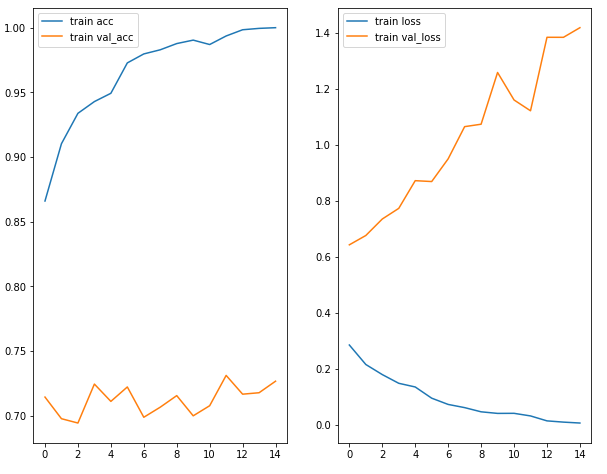
plt.figure(figsize=(10, 8))

plt.subplot(1, 2, 1)
plt.plot(epoch_range, acc, label='train acc')
plt.plot(epoch_range, val_acc, label='train val_acc')
plt.legend(loc='best')

plt.subplot(1, 2, 2)
plt.plot(epoch_range, loss, label='train loss')
plt.plot(epoch_range, val_loss, label='train val_loss')
plt.legend(loc='best')
plt.show()


<console>
total train cat images : 1000
total train dog images : 1000
total validation cat images : 500
total validation dog images : 500
total train images : 2000
total validation images : 1000
Model: "sequential"
_________________________________________________________________
 Layer (type)                Output Shape              Param #
=================================================================
 conv2d (Conv2D)             (None, 150, 150, 16)      448

 max_pooling2d (MaxPooling2D  (None, 75, 75, 16)       0
 )

 conv2d_1 (Conv2D)           (None, 75, 75, 32)        4640

 max_pooling2d_1 (MaxPooling  (None, 37, 37, 32)       0
 2D)

 conv2d_2 (Conv2D)           (None, 37, 37, 64)        18496

 max_pooling2d_2 (MaxPooling  (None, 18, 18, 64)       0
 2D)

 flatten (Flatten)           (None, 20736)             0

 dense (Dense)               (None, 512)               10617344

 dense_1 (Dense)             (None, 1)                 513

=================================================================
Total params: 10,641,441
Trainable params: 10,641,441
Non-trainable params: 0
_________________________________________________________________
None
<ipython-input-7-9d77abf10649>:2: UserWarning: `Model.fit_generator` is deprecated and will be removed in a future version. Please use `Model.fit`, which supports generators.
  history = model.fit_generator(
Epoch 1/15
15/15 [==============================] - 11s 772ms/step - loss: 0.2854 - accuracy: 0.8659 - val_loss: 0.6435 - val_accuracy: 0.7143
Epoch 2/15
15/15 [==============================] - 11s 722ms/step - loss: 0.2158 - accuracy: 0.9103 - val_loss: 0.6768 - val_accuracy: 0.6975
Epoch 3/15
15/15 [==============================] - 15s 1s/step - loss: 0.1797 - accuracy: 0.9338 - val_loss: 0.7357 - val_accuracy: 0.6942
Epoch 4/15
15/15 [==============================] - 10s 686ms/step - loss: 0.1486 - accuracy: 0.9428 - val_loss: 0.7738 - val_accuracy: 0.7243
Epoch 5/15
15/15 [==============================] - 11s 787ms/step - loss: 0.1354 - accuracy: 0.9493 - val_loss: 0.8727 - val_accuracy: 0.7109
Epoch 6/15
15/15 [==============================] - 9s 582ms/step - loss: 0.0954 - accuracy: 0.9728 - val_loss: 0.8696 - val_accuracy: 0.7221
Epoch 7/15
15/15 [==============================] - 11s 762ms/step - loss: 0.0731 - accuracy: 0.9797 - val_loss: 0.9508 - val_accuracy: 0.6987
Epoch 8/15
15/15 [==============================] - 9s 581ms/step - loss: 0.0616 - accuracy: 0.9829 - val_loss: 1.0658 - val_accuracy: 0.7065
Epoch 9/15
15/15 [==============================] - 8s 572ms/step - loss: 0.0467 - accuracy: 0.9877 - val_loss: 1.0745 - val_accuracy: 0.7154
Epoch 10/15
15/15 [==============================] - 9s 581ms/step - loss: 0.0410 - accuracy: 0.9904 - val_loss: 1.2594 - val_accuracy: 0.6998
Epoch 11/15
15/15 [==============================] - 10s 666ms/step - loss: 0.0413 - accuracy: 0.9870 - val_loss: 1.1612 - val_accuracy: 0.7076
Epoch 12/15
15/15 [==============================] - 8s 584ms/step - loss: 0.0320 - accuracy: 0.9936 - val_loss: 1.1225 - val_accuracy: 0.7310
Epoch 13/15
15/15 [==============================] - 9s 579ms/step - loss: 0.0143 - accuracy: 0.9984 - val_loss: 1.3852 - val_accuracy: 0.7165
Epoch 14/15
15/15 [==============================] - 11s 720ms/step - loss: 0.0098 - accuracy: 0.9995 - val_loss: 1.3851 - val_accuracy: 0.7176
Epoch 15/15
15/15 [==============================] - 9s 598ms/step - loss: 0.0066 - accuracy: 1.0000 - val_loss: 1.4195 - val_accuracy: 0.7266
url을 입력하여 경로 설정 뒤, keras로 zip 압축을 풀 수 있다.
c드라이브 사용자에 .keras\datasets\cats_and_dogs_filtered 안에 사진이 다운로드 되어있다.
# 과적합 발생
# 원인 : 데이터 수 부족 의심 - 데이터 보강을 해보자
!find / -name 'cats_and_dogs*'
!ls /root/.keras/datasets/cats_and_dogs_filtered/train/cats/ -la
리눅스 명령어로 폴더 안에 들어있는 파일들을 볼 수 있다.


# 과적합 발생
# 원인 : 데이터 수 부족 의심 - 데이터 보강을 해보자
image_gen_train = ImageDataGenerator(
    rescale=1. / 255,
    rotation_range=30,
    width_shift_range=15,
    height_shift_range=15,
    horizontal_flip=True,
    zoom_range=0.5
)

train_data_gen = image_gen_train.flow_from_directory(batch_size=batch_size,
                                                           directory=train_dir,
                                                           shuffle=True,
                                                           target_size=(IMG_HEIGHT, IMG_WIDTH),
                                                           class_mode='binary')
# 보강 이미지 시각화
augmented_img = [train_data_gen[0][0][0] for i in range(5)]
plotImage_func(augmented_img)

image_gen_val = ImageDataGenerator(
    rescale=1. / 255
)

train_data_gen = image_gen_val.flow_from_directory(batch_size=batch_size,
                                                           directory=train_dir,
                                                           target_size=(IMG_HEIGHT, IMG_WIDTH),
                                                           class_mode='binary')


# new_model
new_model = Sequential([
    Conv2D(filters=16, kernel_size=3, strides=1, padding='same', input_shape=(IMG_HEIGHT, IMG_WIDTH, 3), activation='relu'),
    MaxPooling2D(pool_size=2), # pool_size=(2,2) default값
    Dropout(rate=0.2),
    Conv2D(filters=32, kernel_size=3, strides=1, padding='same', activation='relu'),
    MaxPooling2D(pool_size=2),
    Dropout(rate=0.2),
    Conv2D(filters=64, kernel_size=3, strides=1, padding='same', activation='relu'),
    MaxPooling2D(pool_size=2),
    Dropout(rate=0.2),
    Flatten(),
    Dense(units=512, activation='relu'),
    Dense(units=1) # 위에서 class_mode에 'binary'를 주었기 때문에 안 줘도 된다.
])

new_model.compile(optimizer='adam', loss=tf.keras.losses.BinaryCrossentropy(from_logits=True), metrics=['accuracy'])
print(new_model.summary())

# 새로운 모델로 학습
history = new_model.fit_generator(
    train_data_gen,
    steps_per_epoch=total_train // batch_size, # 하나의 에폭을 처리하고 다음 에폭을 시작하기 전까지 generator에서 생성할 단계(샘플배치)의 총갯수
    epochs = epochs,
    validation_data=val_data_gen,
    validation_steps=total_val // batch_size
)

new_model.save('catdog.h5')

# 학습 결과 시각화
acc = history.history['accuracy']
val_acc = history.history['val_accuracy']
loss = history.history['loss']
val_loss = history.history['val_loss']

epoch_range = range(epochs)

plt.figure(figsize=(10, 8))

plt.subplot(1, 2, 1)
plt.plot(epoch_range, acc, label='train acc')
plt.plot(epoch_range, val_acc, label='train val_acc')
plt.legend(loc='best')

plt.subplot(1, 2, 2)
plt.plot(epoch_range, loss, label='train loss')
plt.plot(epoch_range, val_loss, label='train val_loss')
plt.legend(loc='best')
plt.show()


<console>
Model: "sequential_1"
_________________________________________________________________
 Layer (type)                Output Shape              Param #
=================================================================
 conv2d_3 (Conv2D)           (None, 150, 150, 16)      448

 max_pooling2d_3 (MaxPooling  (None, 75, 75, 16)       0
 2D)

 dropout (Dropout)           (None, 75, 75, 16)        0

 conv2d_4 (Conv2D)           (None, 75, 75, 32)        4640

 max_pooling2d_4 (MaxPooling  (None, 37, 37, 32)       0
 2D)

 dropout_1 (Dropout)         (None, 37, 37, 32)        0

 conv2d_5 (Conv2D)           (None, 37, 37, 64)        18496

 max_pooling2d_5 (MaxPooling  (None, 18, 18, 64)       0
 2D)

 dropout_2 (Dropout)         (None, 18, 18, 64)        0

 flatten_1 (Flatten)         (None, 20736)             0

 dense_2 (Dense)             (None, 512)               10617344

 dense_3 (Dense)             (None, 1)                 513

=================================================================
Total params: 10,641,441
Trainable params: 10,641,441
Non-trainable params: 0
_________________________________________________________________
None
오버피팅이 되었기때문에 이미지를 보강하고 Dropout을 사용해보았다.

# 새로운 이미조로 분류 예측
from google.colab import files
from keras.preprocessing import image

mymodel = tf.keras.models.load_model('catdog.h5')

uploaded = files.upload()

print(uploaded.keys())

for fn in uploaded.keys():
  path='/content/'+fn
  img=tf.keras.utils.load_img(path, target_size=(150,150))

  x = tf.keras.utils.img_to_array(img)
  x = np.expand_dims(x, axis=0)
  # print(x)
  images = np.vstack([x])
  # print(images)

  classes = mymodel.predict(images, batch_size=10)
  print(classes)

  if classes[0] > 0:
    print(fn + ' 너는 댕댕이')
  else:
    print(fn + '와우 냥이 만세세')


<console>
dict_keys(['mydog.jpeg'])
1/1 [==============================] - 0s 15ms/step
[[483.841]]
mydog.jpeg 너는 댕댕이
참고로 flow_from_directory() 인자의 의미들은 다음과 같다.
- target_size : 추후에 설계할 모델에 들어갈 인풋 이미지 사이즈 중 Width, Height를 입력
- batch_size : 이미지 데이터 원본 소스에서 한 번에 얼마만큼의 이미지 데이터를 가져올 것인지
- class_mode
- 'categorical' : 'categorical_crossentropy' 처럼 멀티-레이블 클래스인데, 원-핫 인코딩된 형태
- 'sparse' : 'sparse_categorical_crossentropy' 처럼 멀티-레이블 클래스인데, 레이블 인코딩된 형태
- 'binary' : 'binary_crossentropy' 처럼 이진 분류 클래스로, 0 또는 1인 형태