Python 데이터 분석
카이제곱 검정 + 웹 연습 문제
코딩탕탕
2022. 11. 7. 13:19
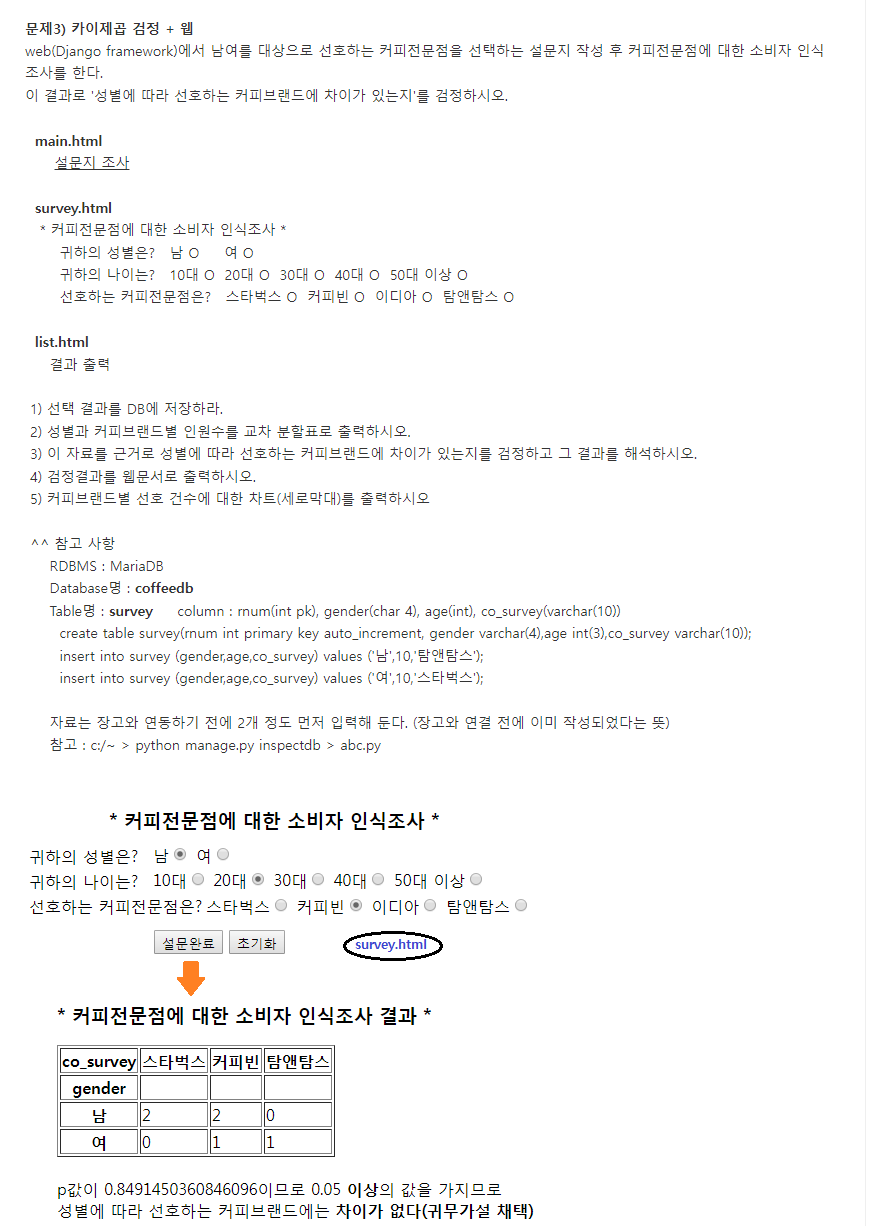
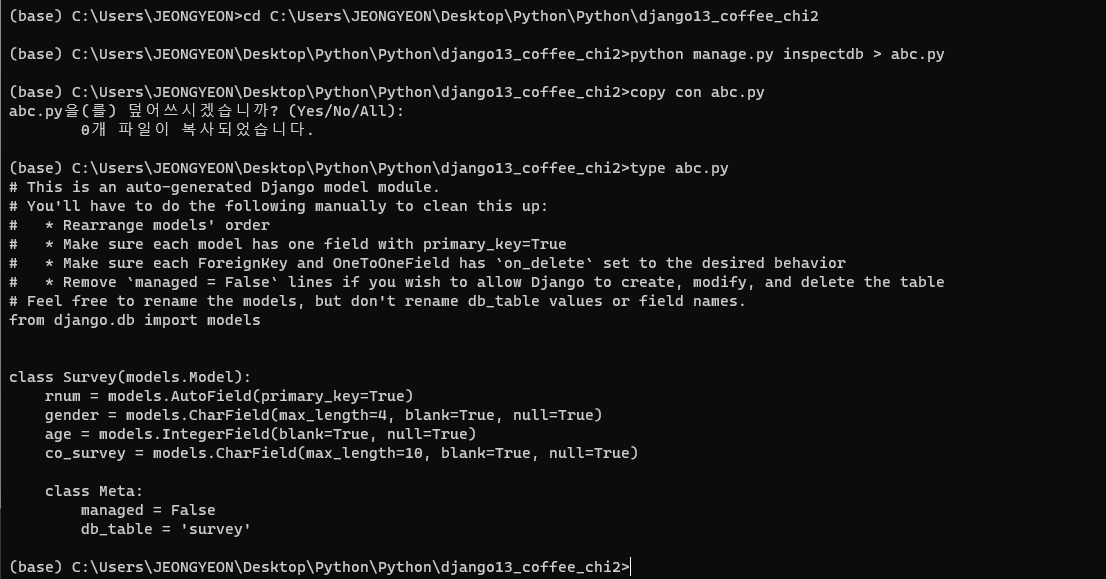
db에 있는 데이터 가져오기
models.py
from django.db import models

# Create your models here.

class Survey(models.Model):
    rnum = models.AutoField(primary_key=True)
    gender = models.CharField(max_length=4, blank=True, null=True)
    age = models.IntegerField(blank=True, null=True)
    co_survey = models.CharField(max_length=10, blank=True, null=True)

    class Meta:
        managed = False
        db_table = 'survey'
urls.py
from django.contrib import admin
from django.urls import path
from mysurvey import views
from django.urls.conf import include

urlpatterns = [
    path("admin/", admin.site.urls),

    path("", views.surveyMain),

    path("coffee/", include('mysurvey.urls')),

]
자식 urls.py
from django.urls import path
from mysurvey import views

urlpatterns = [
    path("survey", views.surveyView),
    path("surveyProcess", views.surveyProcess),
    path("surveyshow", views.surveyAnalysis),

]
migrations, migrate 하기
views.py
from django.shortcuts import render, redirect
import pandas as pd
import scipy.stats as stats
import matplotlib.pyplot as plt
plt.rc('font', family ='malgun gothic')
from mysurvey.models import Survey


def surveyMain(request):
    return render(request, 'main.html')

def surveyView(request):
    return render(request, 'survey.html')

def surveyProcess(request):
    insertData(request)
    return redirect("/coffee/surveyshow") # 추가 후 분석 결과 보기(url 이동해야되기 때문에 redirect)

def surveyAnalysis(request):
    rdata = list(Survey.objects.all().values())
    # print(rdata)
    df = pd.DataFrame(rdata)
    df.dropna()
    # print(df)

    ctab = pd.crosstab(index = df['gender'], columns = df['co_survey'])
    # print(ctab)

    # 카이스퀘어 추정 및 검정
    chi, pv, _, _ = stats.chi2_contingency(observed = ctab)
    print('chi:{}, pv:{}'.format(chi, pv))

    if pv > 0.05:
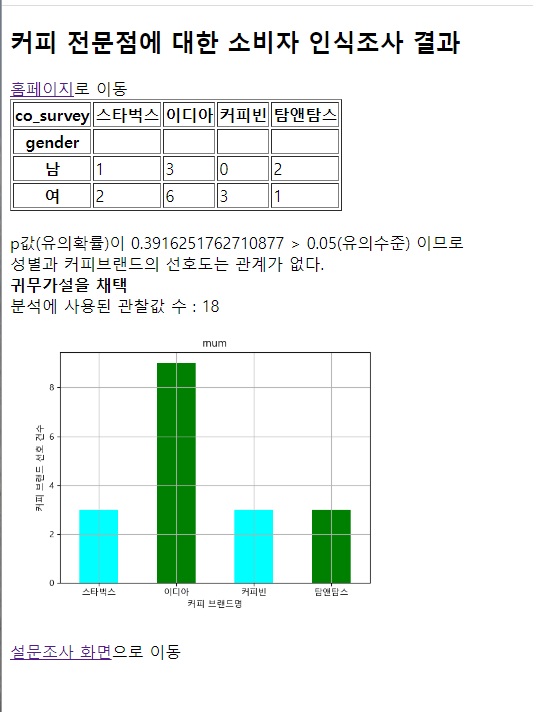
        result = "p값(유의확률)이 {} > 0.05(유의수준) 이므로<br> 성별과 커피브랜드의 선호도는 관계가 없다.<br> <b>귀무가설을 채택</b>".format(pv)
    else:
        result = "p값(유의확률)이 {} < 0.05(유의수준) 이므로<br> 성별과 커피브랜드의 선호도는 관계가 있다.<br> <strong>대립가설을 채택</strong>".format(pv)

    count = len(df)

    # 시각화 : 커피브랜드별 선호 건수에 대한 차트(세로막대)를 출력하시오.
    fig = plt.gcf()
    coffee_group = df.groupby(['co_survey'])['rnum'].count()
    coffee_group.plot.bar(subplots = True, color = ['cyan', 'green'], width = 0.5, rot=0)
    plt.xlabel('커피 브랜드명')
    plt.ylabel('커피 브랜드 선호 건수')
    plt.grid()
    fig.savefig('django13_coffee_chi2/mysurvey/static/images/coffee.png')

    return render(request, 'list.html', {'ctab':ctab.to_html(), 'result':result, 'count':count})
    # DataFrame과 crosstab은 to_html로 넘긴다.


# ------------------
def insertData(request):   # 설문조사 결과를 DB에 저장
    # print(request.POST.get('gender'), ' ', request.POST.get('age'), ' ', request.POST.get('co_survey'))
    if request.method == 'POST':
        Survey(
            gender = request.POST.get('gender'),
            age = request.POST.get('age'),
            co_survey = request.POST.get('co_survey')
        ).save()
main.html
<!DOCTYPE html>
<html>
<head>
<meta charset="UTF-8">
<title>Insert title here</title>
</head>
<body>
<h1>저무는 가을은 커피향보다 아름답다</h1>
[메뉴1] [메뉴2]
<a href="coffee/survey">[커피브랜드 설문]</a>
<a href="coffee/surveyshow">[분석 결과]</a>
</body>
</html>

survey.html
<!DOCTYPE html>
<html>
<head>
<meta charset="UTF-8">
<title>Insert title here</title>
</head>
<body>
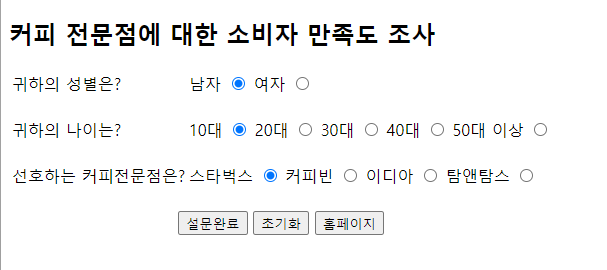
<h2>커피 전문점에 대한 소비자 만족도 조사</h2>
<form action="/coffee/surveyprocess" method = "post">{% csrf_token %}
<table>
	<tr>
		<td>귀하의 성별은?</td>
		<td>
			<label for="genm">남자</label>
			<input type="radio" id="genm" name="gender" value = "남"/>
			<label for="genf">여자</label>
			<input type="radio" id="genf" name="gender" value = "여"/>
		</td>
	</tr>
	<tr>
		<td><br />귀하의 나이는?</td>
		<td><br />
			<label for="age10">10대</label>
			<input type="radio" id="age10" name="age" value = "10" checked = "checked"/>
			<label for="age20">20대</label>
			<input type="radio" id="age20" name="age" value = "20"/>
			<label for="age30">30대</label>
			<input type="radio" id="age30" name="age" value = "30"/>
			<label for="age40">40대</label>
			<input type="radio" id="age40" name="age" value = "40"/>
			<label for="age50">50대 이상</label>
			<input type="radio" id="age50" name="age" value = "50"/>
		</td>
	</tr>
		<tr>
		<td><br />선호하는 커피전문점은?</td>
		<td><br />
			<label for="starbucks">스타벅스</label>
			<input type="radio" id="starbucks" name="co_survey" value = "스타벅스" checked = "checked"/>
			<label for="coffeebean">커피빈</label>
			<input type="radio" id="coffeebean" name="co_survey" value = "커피빈"/>
			<label for="ediya">이디아</label>
			<input type="radio" id="ediya" name="co_survey" value = "이디아"/>
			<label for="tomntoms">탐앤탐스</label>
			<input type="radio" id="tomntoms" name="co_survey" value = "탐앤탐스"/>
		</td>
	</tr>
	<tr>
		<td colspan="2" style="text-align:center;">
			<br />
			<input type="submit" value="설문완료" />
			<input type="reset" value="초기화" />
			<input type="button" value="홈페이지" onclick ="location.href='http://127.0.0.1/'"/>
		</td>
	</tr>
</table>
</form>
</body>
</html>
list.html
<!DOCTYPE html>
<html>
<head>
<meta charset="UTF-8">
<title>Insert title here</title>
</head>
<body>
<h2>커피 전문점에 대한 소비자 인식조사 결과</h2>
<a href="http://127.0.0.1">홈페이지</a>로 이동
<br />
{% if ctab %}
{{ctab | safe}}
{% endif %}
<br />
{% if result %}
{{result | safe}}
{% endif %}
<br />
분석에 사용된 관찰값 수 : {{count}}
<br />
<img src="/static/images/coffee.png" width = "400" alt="맛있는 커피"/>
<br /><br />
<a href="/coffee/survey">설문조사 화면</a>으로 이동
</body>
</html>